What Does It Mean to Bridge ETH to Blast?
Bridging ETH to Blast means transferring Ethereum from the Ethereum Mainnet to the Blast Network. Blast operates as a Layer 2 chain built on Ethereum but runs on its independent blockchain. It still uses ETH for gas payments.
Users bridge ETH to Blast to access DeFi protocols, yield farms, or NFT ecosystems that function only within Blast.
Table of Contents
Why Transfer ETH to Blast?
Investors transfer ETH to Blast for DeFi yield generation, liquidity mining, and staking opportunities. Blast offers high-yield pools and incentive programs that reward liquidity providers with $BLAST tokens.
Projects on Blast often report significant yield opportunities. For example, some users earn returns such as 301,381.83692 $BLAST through specific liquidity farming contracts.
The network design attracts users seeking faster transaction finality, lower gas fees, and native yield on ETH balances.
This quick guide will tell you what’s going on. You’re going to learn how to move ETH from Ethereum to Blast. Blast uses Ethereum to pay for gas but is on its blockchain.
You might, for instance, be trying to farm, invest or mint some NFT. You need Ethereum on the Blast chain for some reason. It’s easy.
Summary: Key Takeaways
Essential insights for bridging Ethereum (ETH) to Blast efficiently and securely.
Steps to transfer Ethereum to Blast
1. Blast.io Go To the main page click “Bridge”, or “Bridge and Earn.”
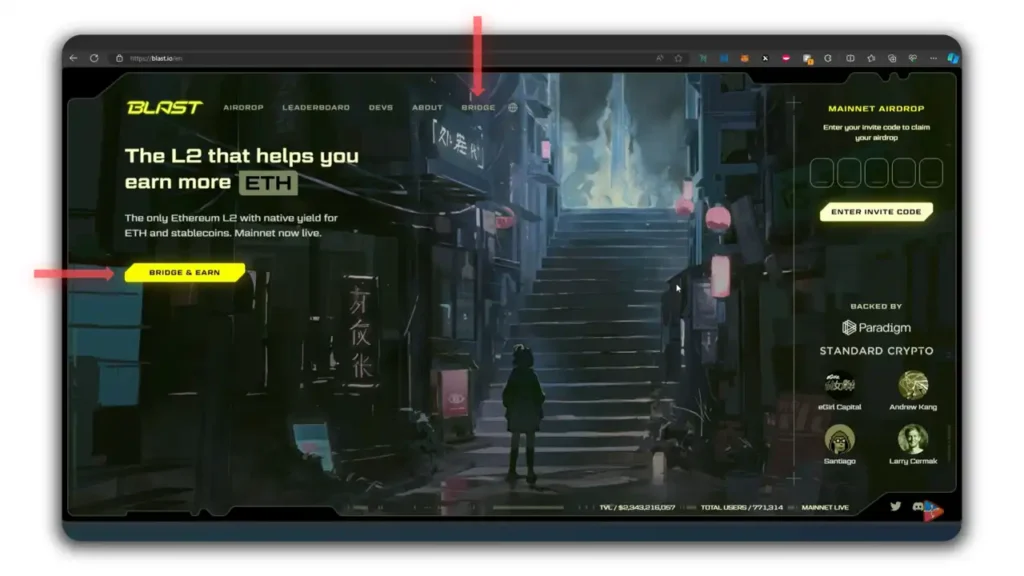
2. This page will appear once you click on it. Click on “Deposit” (it might be selected as default).
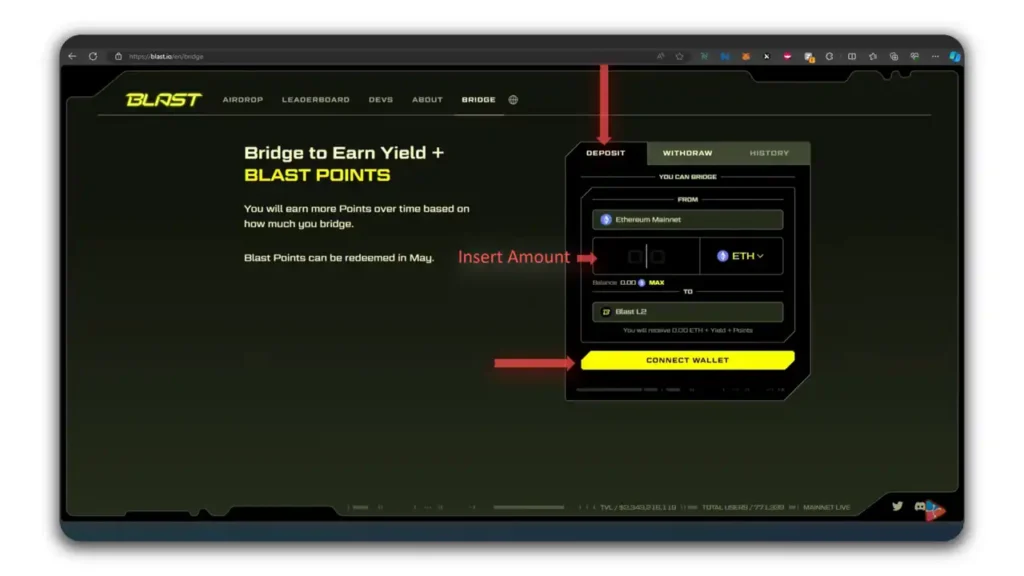
Ethereum Mainnet will be pre-installed on the system.
- You are crossing from Ethereum to Blast.
- Enter the amount that you wish to convert or send to Blast Network.
3. Select “Connect Wallet”. Then press “Next.”
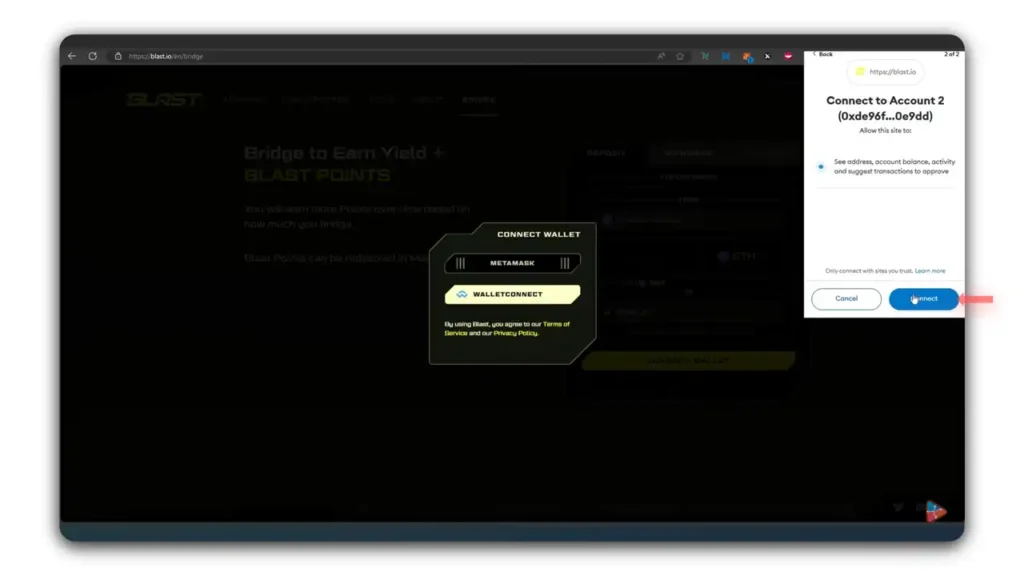
After connecting, enter the amount and click “Submit.”
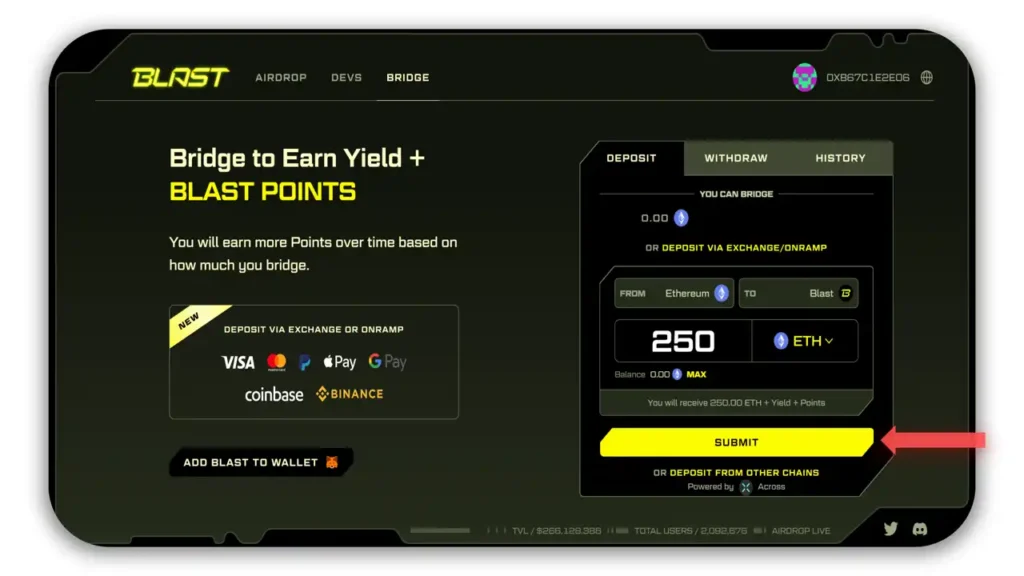
Metamask prompts you once again: continue, accept, and the transaction is processed.Now, your Ethereum will appear in the Blast chain wallet.
Why Transfer ETH To Blast?
Blast deFi opportunities are one of the main reasons why people bridge Ethereum to Blast.
Staking and liquidity pools are included. Some pools offer high rewards as of today.
Some users report returns of 301381.83692 $BLAST when using certain liquidity programs.
How To Convert 301381.83692 $BLAST Back to ETH
To withdraw $BLAST or convert it back to Ethereum, use the withdrawal function on the Blast bridge.
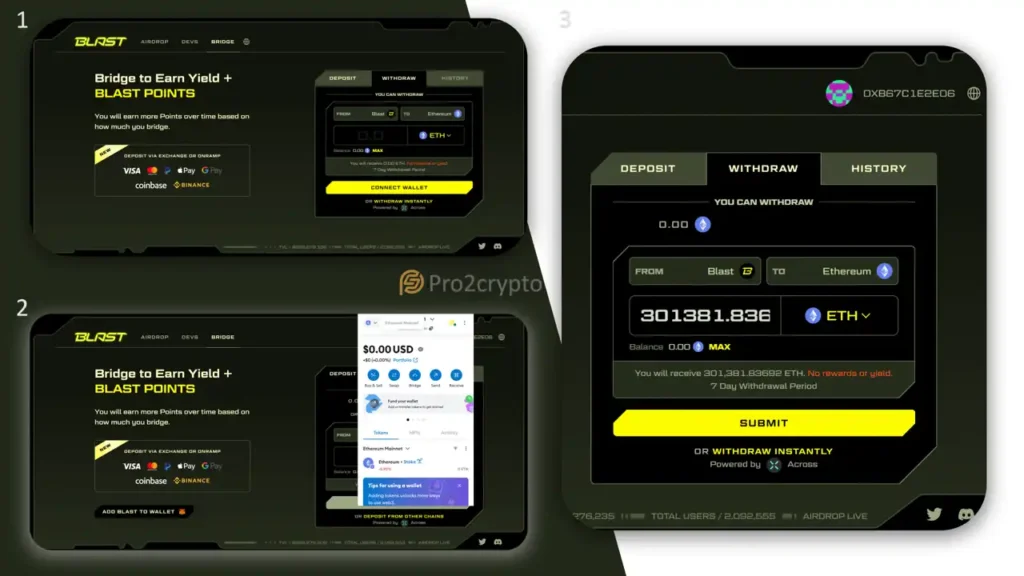
1. Open the Blast Bridge
- Navigate again to Blast.io → Bridge.
2. Select Withdrawal
- Switch from Deposit to Withdrawal.
- Choose Blast Network as the source chain.
- Choose Ethereum Mainnet as the destination.
3. Enter the Amount
- Type the exact amount (e.g., 301,381.83692 $BLAST) you wish to withdraw.
- Connect your MetaMask wallet and approve the transaction.
4. Confirm the Transfer
- MetaMask will request confirmation twice — once for initiation and once for final execution.
- After the bridge confirms the process, your tokens appear in your Ethereum wallet as ETH.
How To Switch Between Ethereum and Blast Networks
After bridging, MetaMask may remain connected to the Blast Network. To return to Ethereum:
- Open MetaMask.
- Click the Network Selector at the top of the wallet.
- Choose Ethereum Mainnet.
Switching networks restores your wallet’s view to your Ethereum assets. You can toggle between networks anytime to manage both balances efficiently.
What Should You Remember Before Bridging ETH to Blast?
| Step | Key Action | Purpose |
|---|---|---|
| 1 | Verify URLs | Avoid phishing sites |
| 2 | Use official bridge | Prevent loss of funds |
| 3 | Maintain gas balance | Required for transactions |
| 4 | Wait for confirmations | Ensures security and finality |
| 5 | Monitor wallet addresses | Use same address for both chains |
These safety measures help protect your assets during cross-chain operations.
Bridging ETH to Blast combines Ethereum’s security with Blast’s speed and yield features, providing new opportunities for decentralized finance users.
Thank you for reading!
This version integrates the keyword strategically and keeps it natural while increasing user engagement. Please let me know if there are any changes you would like to make!